Ultimate Parental Controls
What are your kids looking at on their phones?
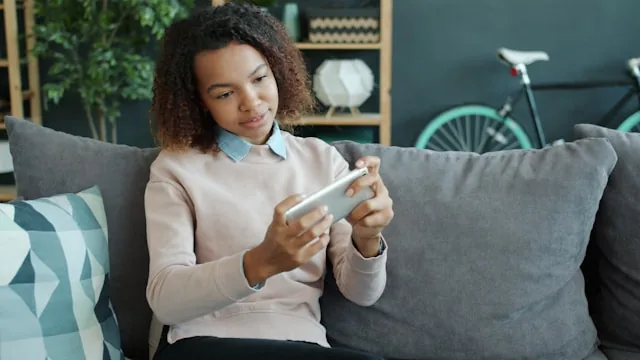
CleanPhone gives parents full visibility and control - manage apps, monitor activity, and set limits from anywhere.
Everything you need to keep your kids safe
Manage your child's phone from anywhere, via our parent dashboard.
App Management
Block or allow any app in a single click, keeping distractions off-limits when they should be.
Screen Time
See exactly how long your child spends in each app, and help build healthier daily habits.
Scheduling
Set internet and app access by schedule - school, bedtime, dinner - so limits run themselves.
Call Log
Review incoming and outgoing calls at a glance, staying aware without hovering over their shoulder.
SMS Monitoring
Read text conversations any time, so you can start the right talks at the right moment.
GPS Location
Locate your child or a lost phone in real time, for peace of mind wherever they go.
Personal Play Store
Approve exactly which apps they can see in the Play Store, so there are never any surprise downloads.
Multiple Devices
Manage every child's phone from one parent account, so your whole family stays covered.
Remote Sync
Push new settings to any device from anywhere, with changes taking effect in just seconds.
Tamper Protection
Controls can't be disabled or uninstalled by your child, so your settings always stay in place.
Manage your devices from anywhere
Download the Clean Router Parent App to review activity, adjust limits, and manage your CleanPhone devices right from your own phone.

How it works
Up and running in four simple steps.
Order a CleanPhone
Select and order the CleanPhone device from our purchase portal.
Set up the Phone
Activate the phone and follow the steps on the CleanPhone Setup app.
Access the Portal
Create your parent/admin account to view each device and their settings.
You're Protected!
Customize apps, schedules, and limits - anytime, anywhere.
No Contracts, Cancel at Any Time
Note: Canceling will require fully resetting your device.
Technical Specifications
- Operating system
- Android
- Supported carriers
- Unlocked: AT&T, Verizon, T-Mobile, and subsidiary carriers
- Connectivity
- 5G, Bluetooth, Wi-Fi, USB Type C
- Display
- 6.6" LCD, 1612 x 720, 120 Hz
- Storage
- 128 GB
- Battery
- 5000 mAh
- Compatibility
- Android only (no iPhone support)
- What's in the box
- Phone, charging cable, manual, SIM tray ejector
Please Note
CleanPhone is a parental-controls app and phone bundle, not a phone carrier. Your purchase does not include a phone plan, SIM card, cellular data, or service. An active plan from a carrier is required to use the phone. The device is unlocked and compatible with most major carriers.
Frequently Asked Questions
What does my subscription cover?
Your subscription gives you access to the management portal, scheduling controls, technical support, and CleanBrowser as well as additional CleanTechnology apps that will be available for use (more coming soon).
Which cell carriers are supported?
The phones are unlocked and work with AT&T, Verizon, T-Mobile, US Cellular, Boost Mobile, Metro by T-Mobile, Cricket, Google Fi, Tracfone, Consumer Cellular, Mint Mobile, Ultra Mobile, Total by Verizon, Visible, and H2O Wireless.
How do I manage a phone?
You can log in to the CleanPhone Parent Portal anytime to configure one (or more) phone(s).
Can I bring my own device?
We do not support Bring Your Own Device options.
Do you sell iPhone models?
Currently, CleanPhone is not compatible with iPhones due to iOS limitations, only Android devices.
What is your return policy?
You own the phone you purchase. Returns are accepted only if the package is unopened. Once a package has been opened, the sale is final; we can, however, remove our remote access and factory reset the phone so you can use it on your own without the parental controls installed.
Ready to protect your family?
Join the many families who trust CleanPhone to keep kids safe online.
Get Started TodayCustomer Reviews
"What an awesome and safe phone for my kids!"
Riley C.
"The CleanPhone has done everything we wanted."
Kristy P.
"I love how I can choose the apps my kids have access to."
Chad S.
"I was scared to give my boys phones. CleanPhone has given me the perfect level of control and flexibility."
Sherry L.
Ultimate Parental
Controls
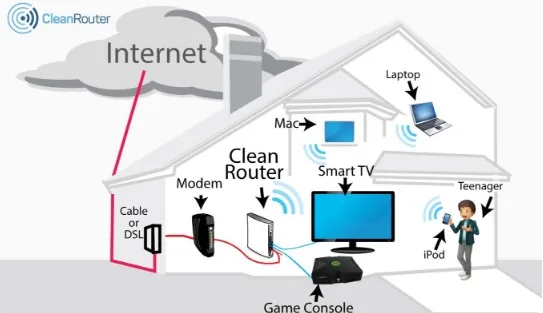
Check out CleanRouter. It lets you manage every device on your home network.
Network Secure
12 Devices Protected
Site Blocked
Adult Content